WHY DOES ALMOST NO ONE USE ONE OF THE BEST INTERNET SECURITY TOOLS NEARLY EVERYONE ALREADY HAS?!!!
If you don't enable your status bar before you leave your website, you're just ASKING for a virus!
I used to work at a computer lab at a local community college, tutored there on the side, and took classes as well. One of the most powerful internet safety tools I found to be ridiculously under valued was the status bar. It's a fantastic tool although its title is somewhat misleading from its best purpose. The title of the "Status Bar" suggests its primary intention- to let you know the "status" of the website your visiting. The commonly accepted purpose of it is to let you know if a page is working or not, things you can usually rather obviously tell. Accordingly, most browser producers turn the status bar off by default. This is a serious mistake. Web surfers should be educated to the golden usage of the status bar: To let you know where you're going- before you get there. The status bar shows you the actual internet address of the link you're holding your mouse cursor over.
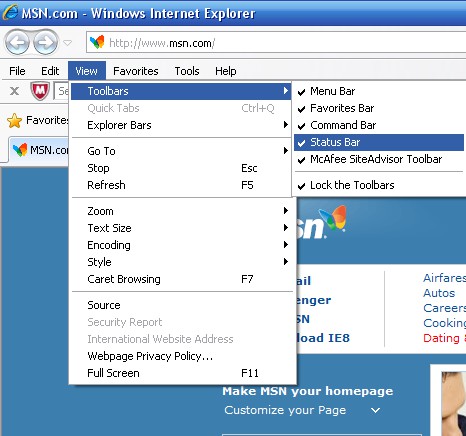
Please turn the status bar on in your browser. Please choose: FireFox, Internet Explorer, Opera, or Chrome. Turn it on in Internet Explorer:
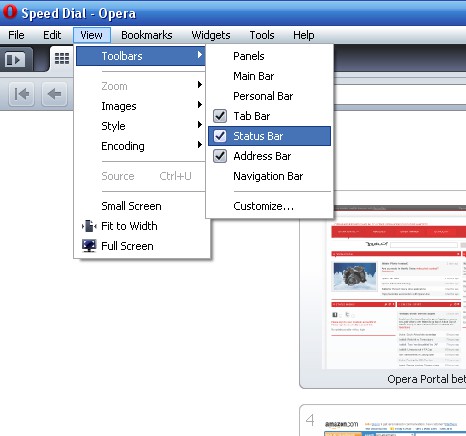
 How to turn it on in Opera
 Chrome: The status bar in Chrome only appears when hovering over a link. It disappears to save web space, although this can be an annoyance for many people. It is a subject of debate: It's unlike other browsers in the way it operates and what it displayed. This section will remain as is until appropriate functionality of the Chrome status bar is set. See complaints: 1 | 2 | 3 Turn the status bar on in FireFox
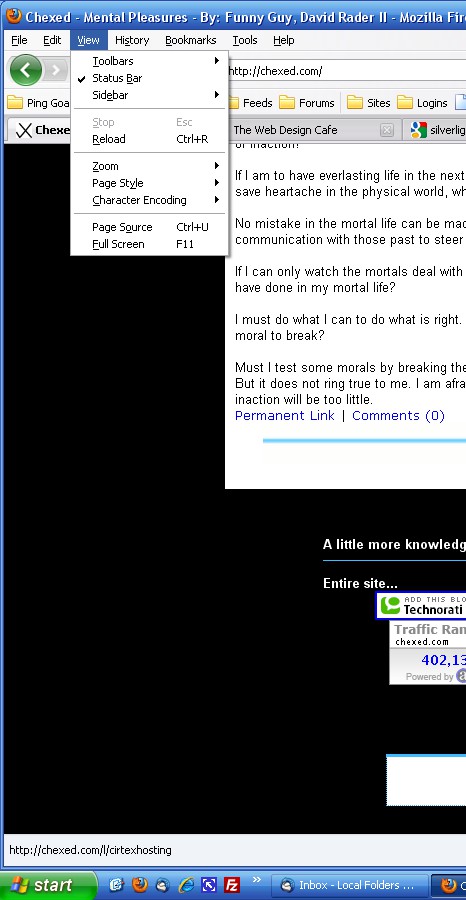
See at the bottom, where it tells you the actual address of the website your visiting? Now that you have it turned on, hold your mouse over any link on this page. Down at the bottom left you will see the actual address that link will send you to if you click on it (example: the image directly above). Without it turned on, you're like a bat in the day time- just wandering until you run into something you don't like. At first it will just be nice to know where you're going. After a while you'll learn what addresses you do and don't want to go to. Here's a few links to try it out: http://chexed.com/ | Web Design Cafe | Rudy | www.yahoo.com | Opera Browser Be aware that there are tricks and hacks which have been able to change the status bar in the past, though securities are getting better. Good luck internet surfers, captains, and tourists. If you would ever like to avoid untrustworthy sites brought up in Google or Yahoo's lists, you might want to check out my number #1 plugin review for IE and FireFox: McAfee Site Advisor. I consider it invaluable and I am not paid or endorsed by McAfee to promote it. It's that damned good.
|